
The Endnote Cite While Your Write (CWYW) Toolbar does seem to cause trouble every once in a while. It may be disabled, not visible or simply gone. Endote has a FAQs that list a couple of solutions for the problem. But none of them brought my toolbar back. In the end I found the solution:
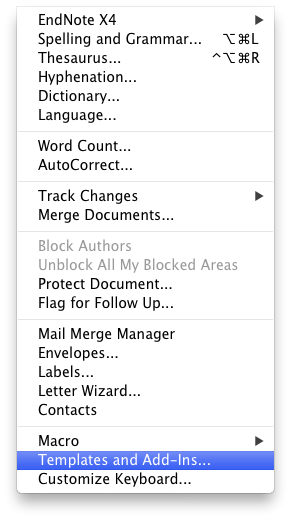
Go to Microsoft Word and select Tools > Templates and Add-Ins…
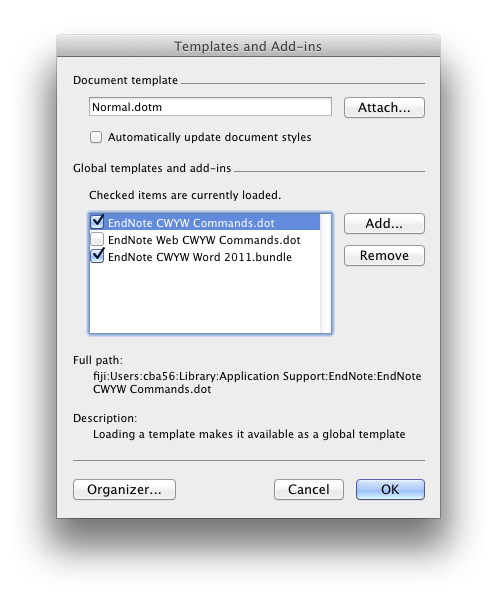
Then make sure that that the Endote CWYW Commands.dot and Endnote CWYW Word 2011.bundle are loaded:
How to downlad “EndNote CWYW Commands.dot”, beacause it is missed in my mac :(
Thank you
Thank you! Nobody else seemed to offer a solution for what to do if you accidentally closed the toolbar and couldn’t find it again. So glad to find this.
thank you a lot. I found the “EndNote CWYW Commands.dot” in Endnote folder.
Phew, took me crazy time until found this! Thanks
Sorry, but this did not help at all. How do you load these items if they are missing?? It does not say how to load them and I have tried pressing the “Add….” button and clicking on bundles to no avail.
you can see it by view>toolbars>endnote
I could not find “EndNote CWYW Commands.dot” in Endnote folder.
Please tell me where it is located.
Ser
It really does works. Thank you!
Brilliant! Even the folks at Thomson Reuters could not provide such a helpful and understandable solution. Thank you very much!
If it is empty, open Endnote in Applications, keep opening folders till you find the missing items. Drag them onto the desk top. Find Word in Office in Applications, then drag the items into Word. It all works fine then.
It works Thank you you saved my life
I did exactly that and both buttons are already checked. Yet the toolbar remains missing. Any ideas?
Thank you so much!!!! Really life saving!!!
If the tools do not appear:
Close Word and EndNote.
Open your hard drive and go to the folder: EndNote X-: Applications:EndNote X-:Cite While You Write
Copy the file EndNote CWYW Word 2011.bundle
Go to the folder Applications:Microsoft Office 2011:Office:Startup:Word and paste the copied file
Start Word, go to Word > Preferences and click on File Locations
Make sure the Startup folder is set by highlighting Startup and clicking on Modify. Navigate to Applications folder then Microsoft Office 2011:Office:Startup:Word and click Choose
Click OK and close Word.
Start EndNote and then start Word.
Thank you very very much . nobody EVER had this solution before. Frank
In my word the EndNote Cwyw Command.dot was missing. I found it here: Libary:Application Support:EndNote
I just darg and dropped it onto word – bang!
Thank you very much! This problem almost drove me crazy!
Hi when I try the above suggestion it comes up with this
“word could not add this add-in program”
I almost gave up on trying until I found this! REALLY helpful. Thanks a lot!!
Thanks to Bartneck and Gulmel!
I had to do what Ilsa suggested. Worked like a charm. Thanks.
Thanks Gumel–that was a magnificent set of instructions, which quickly solved my problem!
Unfortunately, in my file locations there is no startup folder. Does anyone know how I can make it appear there?
Thank you so much!
U have no idea how much it helped, Thanks
for those needing more detailed assistance on how to create the startup folder: http://endnote.com/kb/112176
these were very helpful step by step instructions
Thank you so much. This really helps.
Hey _ I still can’t get it…neither solution works! I have a student version of Word for Mac and ‘Microsoft Office’ doesn’t appear in the list of Apps – only the individual Word, excel etc. Also in the View dropdown in Word – toolbars isn’t there!! This is driving me insane!
Thank you Gumel. It really works. Life saving…
I have followed the instructions provided by both Christoph and Gumel. Unfortunately neither of them are working..
Christopher: When i try to select the add in’s in word they are greyed out and it will not let me select them.
Gumel: I get “Word can not load this add-in program. EndNote CWYW Word 2011.bundle” on start up.
Can someone please help me out with what this means and other possible solutions, I cannot find any decent information anywhere!!!!
Thanks :) Michelle
Vielen vielen Dank an Gumel. Super und hilfreich. Tolle Anleitung. Thanks from Germany
Thank you for the solutions, althought non have yet worked.
I am having the same problem as Emma, Emma, have you found an answer yet?
Thanks, Rhianna
Same problem like Emma and Michelle: Microsoft Word 2015 for MAC and endnote x7 and I can find no way to connect them, which means: I cannot write my paper…Help! Please!
I had the same problem as Michelle. I tried to reinstall Endnote from the original disc and it automatically added CWYW module. Everything is back to normal!
Hope this helps,
Larisa
You are awesome. For some reason the garbage always breaks down when you need it most. Thanks for the advice – worked for me.
Thanks!!!
Great Grumel! Thanks!!!!!
It works perfectly. Thanks so much
thank you very much
Chris, I have the exact same problem. I believe you nailed the problem but I still can not fix my issue. Unfortunately, my endnote seems to miss the “EndNote Commander.dot” file. I couldn’t find it in the web. Do you know if I could get somewhere else?
I moved on to Office 2016 and Endnote 7.5. So I can’t really tell, but I would assume it would be there again if you reinstall your version of Endnote.
I’ve tried it all but still can’t make it work. It’s so frustrating. :(
Thnks. The first time i found a real solution for this Probelm
Hello everyone,
I have the same problem as most people here. I use MS Office 2011 and Endnote X8 and I can’t finde the “EndNote CWYW Commands.dot”. I tried everthing elso so I guess this is the only option left. Where can I find it??
Greeting from Germany
if you have no item it this box you can add endnote tab by app endnote. open endnote app, click on endnote button (left, up corner)>customizer> cite while you write addition for Microsoft word.
Hey, I found out why “EndNote CWYW Commands.dot” didn’t show up. For Endnote to work properly you need Visual Basic to be installed. If there is not a single file in Applications/Microsoft Office 2011/Office that starts with “Visual Basic”, than it is not installied on your Mac. In that case, reinstall Word 2011 for Mac. It worked for me.
WOW!! Thanks for the detailed steps.
Thanks to Maryam, “if you have no item it this box you can add endnote tab by app endnote. open endnote app, click on endnote button (left, up corner)>customizer> cite while you write addition for Microsoft word.” >> this solution is the best, fast and no problem.