Building Instructions for a cable that connects LEGO Power Functions (PF) with Mindstorms NXT/EV3

Harry Davis and me built a cable to connect a LEGO Power Functions (PF) motor to a Mindstorms EV3. The goal is to enable the EV3 to control PF motors. In particular I wanted to control a RC train motor through an EV3.

LEGO produced a cable (8528) to connect old motors (RCX) to the NXT, but it is no longer in production. You can still get them through Bricklink, but it will cost you dearly. You still need a PF extension cable to convert the old motor plug (RCX) to the current PF plug.
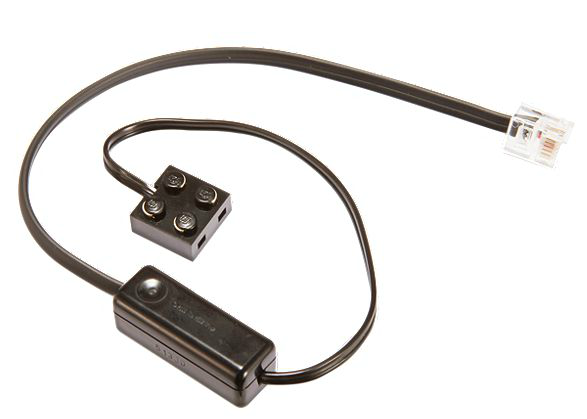
convert cable

Firgelli produced a cable that allowed you to connect an modern PF to NXT directly, but it is also no longer in production.
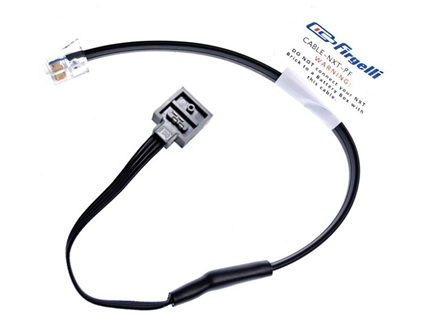
firgelli nxt pf cable

There are two more solutions but both are more complex and costly. First, you can use the PF Mate from Mindsensors (currenlty $35). It sends IR signals to the IR PF receiver and thereby allows you to control motors even at a distance. The second option is the GlideWheel PF (currently $38) that directly connects a PF motor to the EV3. It also features a rotation sensor so that you can control the PF just like you would control a Mindstorms encoded motor. Both of these solutions offer a great functionality but they are also expensive, in particular since the components necessary for a custom made cable only costs a few cents.

At Amazon you can get a book Make: Lego and Arduino Projects: Projects for extending MINDSTORMS NXT with open-source electronics that will show you how to do such projects, but for now it is time to pull up our sleeves and do it ourselves. TechnicRobot already showed that it can be done but detailed instructions were not yet available. We also built a casing for our cable so that it can be easily integrated into your model. Here is the final result:

EV3 PF Cable - 17

And here is a video that shows our solution at work:
Continue reading “Building Instructions for a cable that connects LEGO Power Functions (PF) with Mindstorms NXT/EV3”

Review Dexter DLight for LEGO Mindstorms

Dexter Industries offers the DLight for LEGO Mindstorms. It allows you to control four full color LEDs through a sensor port of your EV3 or NXT. The first thing to do is to set the toggle switches on each LED to a unique address, so that you can control each LED individually. In the NXT-G environment you can still decide to control all of them at the same time if desired. The biggest nuisance is that only the first LED can use its red component. The other three cannot show any red light. Dexter acknowledges this bug in its forum and offers refunds. It is ridiculous that Dexter does not warn its customers on its product page, in particular since they do not intend to fix this problem.

LEGO Volvo 42030 Loader with SBrick

Today I finally had the chance to unpack and test my SBrick. I build this Bluetooth LEGO Power Functions brick into my Volvo 42030 Loader. A profile for this LEGO model was already available in SBricks social profile database. I could just download the profile and configure it. Configuration entails defining what motor is attached to what port. You can also invert the direction of each motor if necessary. Once the profile is downloaded an configured, it works like a charm. The best part is the proportional control. You can steer a little bit right. With the IR control from LEGO it is all or nothing control.

Sensor readings Mindsensors Glide AS with EV3 problem

I was working on a new version of my Spirograph Automaton and once I fired up the EV3 software on my computer it informed that a new version was available, including a new 1.06H firmware. I installed both and expected my software to work as it did before. I got some very strange sensor readings. One sensor seemed to overwrite the value of the other sensors. Moreover, once I unplugged and reconnected the sensors it sometimes seem to work again. After rebooting the EV3 it sometimes worked and sometimes it did not. These types of intermittent problems are really annoying and it took me more than an afternoon to figure out that it was not my poor programming skills that caused the problem. Eventually I made a video of the problem and contacted the Mindsensors support.

They replied promptly and informed me that:

“The 1.06H EV3 firmware has a bug in its sensor handler. Even when the i2c addresses are changed the error still occurs. It seems the error stops once the program in executed and then the devices are disconnected and reconnected. This will fix the error until you restart your EV3. If this is too much of an inconvenience, you can use the 1.03H EV3 firmware. 1.03H has been tested and works with the rotation test-ms code. We have notified LEGO about the issue. Hopefully a new firmware fix will come in the near future.”

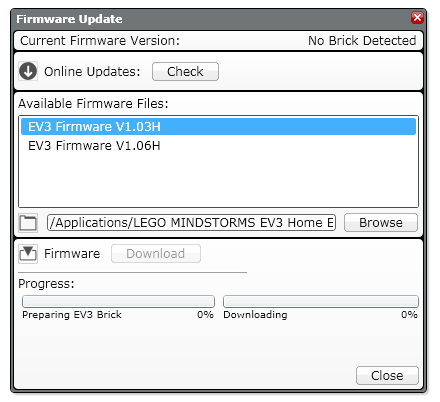
This information was not available on their website and I hope that my post will safe you some time. In case you want to downgrade to the 1.03H EV3 firmware, have a look at this file. To downgrade place the firmware in the folder (on Mac OS X):

/Applications/LEGO MINDSTORMS EV3 Home Edition.app/Contents/MonoBundle/Resources/Firmware

You need to right click on the EV3 software and select “Show Package Contents” to get into the desired directory. The firmware will then show up in the list of the available firmwares in your “Firmware Update” under the Tools menu in the EV3 desktop software.

installFirmwareEV3